 |
Baby Language Lab Scripts
A collection of data processing tools.
|
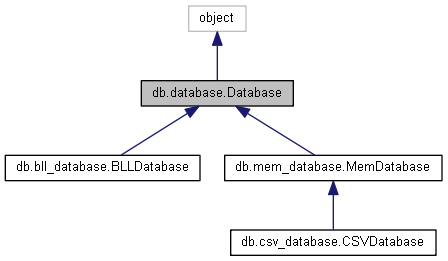
This class provides a basic API layer on top of an SQLite database. More...
Public Member Functions | |
| def | __init__ |
| Constructor. More... | |
| def | close |
| Closes the database connection, releasing any resources that it was using. More... | |
| def | execute_stmt |
| Executes a verbatim SQL statement. More... | |
| def | execute_script |
| Reads and executes a sql script file. More... | |
| def | insert |
| Inserts one or more rows into a table in the database. More... | |
| def | select |
| Selects rows from a table in the database. More... | |
| def | delete |
| Deletes rows from a table in the database. More... | |
| def | update_timestamp_col |
| Updates the value of a timestamp column to the current date/time. More... | |
| def | update |
| Updates rows in a table. More... | |
| def | write_to_file |
| Writes out all of the data in a table to a csv file. More... | |
Public Attributes | |
| conn | |
| cursor | |
This class provides a basic API layer on top of an SQLite database.
Ideally, all SQL should be restricted to this file. Calling code can form queries using the select() method. You can also update(), insert(), and delete().
Definition at line 11 of file database.py.
| def db.database.Database.__init__ | ( | self, | |
| db_filename | |||
| ) |
Constructor.
| self | |
| db_filename | (string) absolute path to the sqlite3 database file (if this does not exist, a new database file will be created) |
Definition at line 15 of file database.py.
| def db.database.Database.close | ( | self | ) |
Closes the database connection, releasing any resources that it was using.
| self |
Definition at line 29 of file database.py.
| def db.database.Database.delete | ( | self, | |
| table, | |||
where_cond = None, |
|||
params = [] |
|||
| ) |
Deletes rows from a table in the database.
| self | |
| table | (string) name of the table to delete from |
| where_cond | (string=None) a boolean condition like ('x=y'). Will generate 'WHERE x=y'. Set to None if no where condition should be generated (deletes all rows in table). Note: Can use '?' as a placeholder for raw data values, then pass the raw values in using the 'params' parameter. Eg. passing 'x=?' for where_cond and [2] for params generates 'WHERE x=2'. Advantage here is that the DB ensures the raw values are properly escaped/quoted. |
| params | (list=[]) list of values to stick in '?' placeholders passed in via the where_cond parameter (or any other parameter). These values are automatically quoted/escaped by the SQLite API. |
Definition at line 136 of file database.py.
| def db.database.Database.execute_script | ( | self, | |
| filename | |||
| ) |
Reads and executes a sql script file.
| self | |
| filename | (string) full path to sql file |
Definition at line 51 of file database.py.
| def db.database.Database.execute_stmt | ( | self, | |
| stmt | |||
| ) |
Executes a verbatim SQL statement.
This is used for the custom processing scripts (custom_scripts/ directory), and shouldn't really be used by any general apps, since it doesn't do any sanitization.
| self | |
| stmt | (string) a complete sql statement to execute. |
Definition at line 38 of file database.py.
| def db.database.Database.insert | ( | self, | |
| table, | |||
| cols, | |||
| rows | |||
| ) |
Inserts one or more rows into a table in the database.
| self | |
| table | (string) name of the table to insert into |
| cols | (string) column names of this table (can omit autogenerated/defaulted cols) |
| rows | (list) a list of lists, (one sublist for each row) containing the data values to insert. These must all be the same length |
Definition at line 70 of file database.py.
| def db.database.Database.select | ( | self, | |
| table, | |||
| cols, | |||
where_cond = None, |
|||
params = [], |
|||
order_by = None, |
|||
dump_sql = False, |
|||
group_by = None |
|||
| ) |
Selects rows from a table in the database.
| table | (string) name of the table to select from (can be multiple joined tables - eg. 'table1 join table2 on x=y') |
| cols | (list) list of column names (string) to select |
| where_cond | (string=None) a boolean condition like ('x=y'). Will generate 'WHERE x=y'. Set to None if no where condition should be generated. Note: Can use '?' as a placeholder for raw data values, then pass the raw values in using the 'params' parameter. Eg. passing 'x=?' for where_cond and [2] for params generates 'WHERE x=2'. Advantage here is that the DB ensures the raw values are properly escaped/quoted. |
| params | (list=[]) list of values to stick in '?' placeholders passed in via the where_cond parameter (or any other parameter). These values are automatically quoted/escaped by the SQLite API. |
| order_by | (string=None) a column name, or multiple comma-separated column names, to order by. Eg. passing in 'time, id' generates 'ORDER BY time, id'. Pass None if no order by clause is needed. |
| dump_sql | (boolean=False) Set to True if you wish to print the generated statement (before '?' substitution - unfortunately sqlite api restrictions make it difficult to access the final sustituted verison...) to standard output. |
| group_by | (string) This string is inserted into to SQL statement after the where clause. It can be a single column name, or multiple names separated with commas (Eg. 'child_id', or 'child_id, awc'). |
Definition at line 104 of file database.py.
| def db.database.Database.update | ( | self, | |
| table, | |||
| cols, | |||
where_cond = None, |
|||
params = [], |
|||
dump_sql = False |
|||
| ) |
Updates rows in a table.
| table | (string) name of table to update |
| cols | (list) list of names of columns (strings) to update |
| where_cond | (string=None) a boolean condition like ('x=y'). Will generate 'WHERE x=y'. Set to None if no where condition should be generated. Note: Can use '?' as a placeholder for raw data values, then pass the raw values in using the 'params' parameter. Eg. passing 'x=?' for where_cond and [2] for params generates 'WHERE x=2'. Advantage here is that the DB ensures the raw values are properly escaped/quoted. |
| params | (list=[]) list of values to stick in '?' placeholders generated for each column we are updating. The last param is in this list is used for the where_cond parameter (if any). These values are automatically quoted/escaped by the SQLite API. |
| dump_sql | (boolean=False) Set to True if you wish to print the generated statement (before '?' substitution - unfortunately sqlite api restrictions make it difficult to access the final sustituted verison...) to standard output. |
Definition at line 193 of file database.py.
| def db.database.Database.update_timestamp_col | ( | self, | |
| table, | |||
| col, | |||
where_cond = None, |
|||
params = [] |
|||
| ) |
Updates the value of a timestamp column to the current date/time.
| self | |
| table | (string) name of table to update |
| col | (string) name of timestamp column |
| where_cond | (string=None) a boolean condition like ('x=y'). Will generate 'WHERE x=y'. Set to None if no where condition should be generated. Note: Can use '?' as a placeholder for raw data values, then pass the raw values in using the 'params' parameter. Eg. passing 'x=?' for where_cond and [2] for params generates 'WHERE x=2'. Advantage here is that the DB ensures the raw values are properly escaped/quoted. |
| params | (list=[]) list of values to stick in '?' placeholders passed in via the where_cond parameter (or any other parameter). These values are automatically quoted/escaped by the SQLite API. |
Definition at line 165 of file database.py.
| def db.database.Database.write_to_file | ( | self, | |
| path, | |||
| table | |||
| ) |
Writes out all of the data in a table to a csv file.
| self | |
| path | (string) The location in which you'd like to save the csv file. (Eg. 'C:/Wayne/data.csv') |
| table | (string) Name of the database table to read data from. |
Definition at line 227 of file database.py.
| db.database.Database.conn |
Definition at line 19 of file database.py.
| db.database.Database.cursor |
Definition at line 22 of file database.py.
 1.8.3.1
